
Docs
Features
Every Seedly Communities module explained - feed, chat, courses, challenges, coaching, and more.
Last updated
This page walks through Seedly Communities module by module: what each one does, and what it lets your members and admins accomplish.
Feed and Posts#
The feed is the community's home base - a threaded discussion space where members share posts, comment, like, and react in real time.
- Six post types: discussion, question, poll, link, image, and video
- Rich text editor with headings, lists, links, code blocks, and blockquotes
- Image uploads with multi-image posts
- Polls with configurable options and live vote counts
- Video embed support from major platforms
- @mention autocomplete for members
@everyonebroadcast (admins only) notifies all active members- Drafts - save and resume posts without publishing
- Pinned posts - admins can pin important announcements to the top
- Pinned posts carousel on the feed home
- Bookmarks for saving posts to a personal "read later" list
- Real-time comments and likes with live updates
- Reply threading on comments
- Post categories with per-category access control by member level
- Auto-moderation keyword filters with flag, hide, or block actions
- Report-a-post workflow with moderator review queue
Chat#
Real-time direct and group messaging with the features modern users expect.
- Direct messages between any two members
- Group conversations with admin controls, member add/remove, and rename
- File and image attachments
- Emoji reactions on any message
- Reply threading within a conversation
- Message edit and delete
- Typing indicators
- Full-text message search across conversations
- Mute conversation with the bell in the chat header - silence notifications per-thread without leaving
- Members choose who can send them direct messages (everyone or no one), and the choice applies to every message, not only the first
- Unread badges per conversation and a global unread count
Calendar and Events#
A shared community calendar for live sessions, cohort meetings, and member gatherings.
- Month and week calendar views
- One-time and recurring events (daily, weekly, bi-weekly, monthly, by-day)
- Timezone-aware scheduling with DST-safe recurrence
- Per-instance editing for recurring series (edit one occurrence without touching the rest)
- Event detail page with description, cover image, and location
- In-person or video event locations
- RSVPs with Yes / No / Maybe responses
- Waitlist when an event hits capacity, with auto-promotion on cancellation
- Automatic email reminders about an hour before the event
- Event cancellation notifications to all RSVPs
- Audience-restricted events: everyone, course students, challenge participants, coaching clients, or ad-hoc
- Program-linked events tied to coaching programs or course live sessions
Live Events#
Integrated video streaming for the community, with recording and recap built in. Live video and its recordings run on a third-party service you connect with your own account (usage-based pricing on their side).
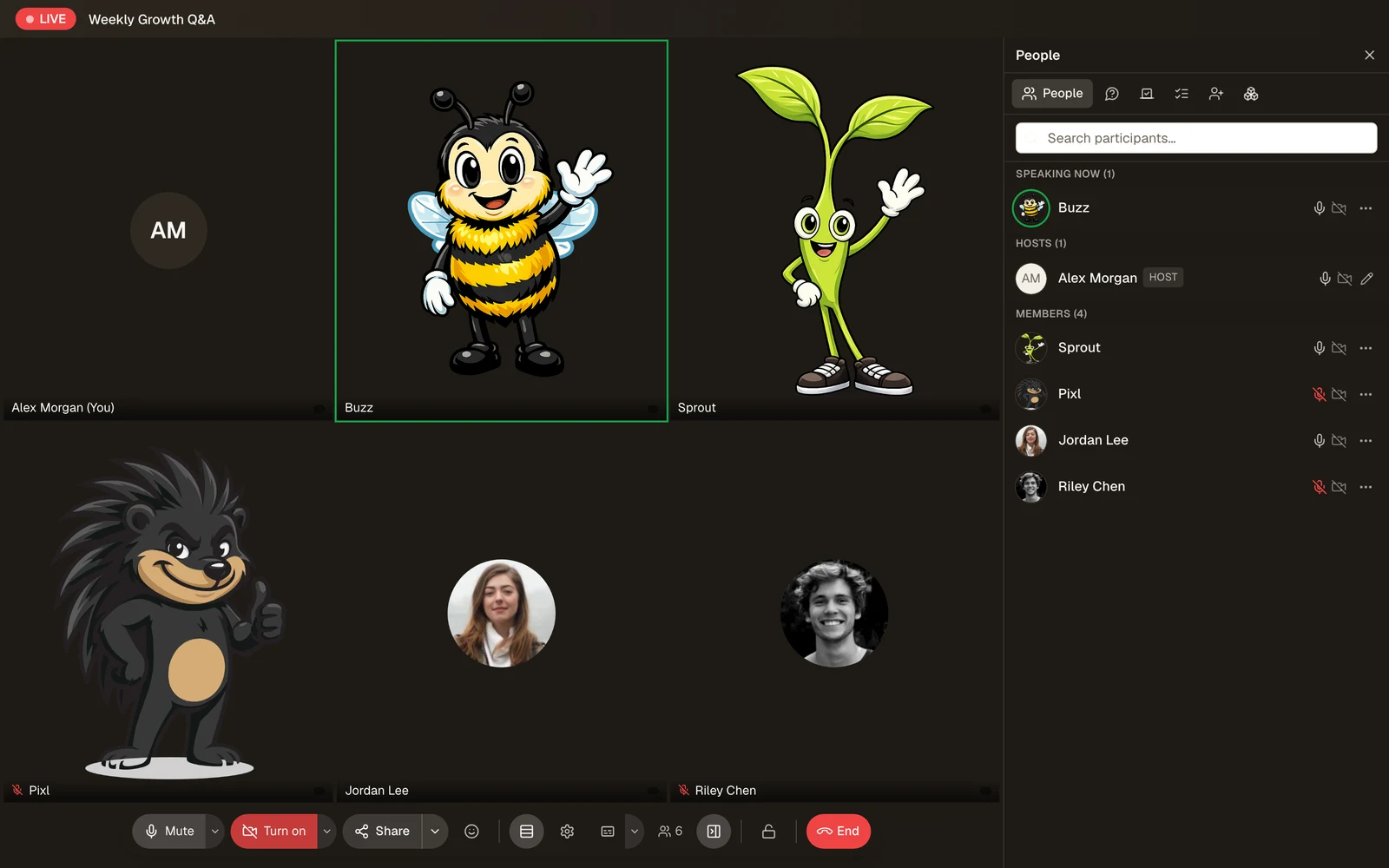
- Admin "Go Live" from any scheduled event or on-demand
- Video, audio, and screenshare with multi-participant grid and speaker views
- Live chat drawer alongside the video
- Pre-join screen with camera and microphone preview
- HD simulcast encoding that adapts automatically to each participant's connection
- Mobile live-event layout with stacked video and togglable chat overlay
- Cloud recording: the host chooses whether to record with the Record this meeting switch before going live (remembered for next time), or starts recording from inside the meeting
- Automatic recap post for sessions started with Go Live from the feed, with the recording playing in an in-app player (text only after two hours if the session was not recorded). Scheduled and recurring events show their recording on the event and its lessons instead of posting a recap
- Recordings kept in your Daily account and played from there
- Audience-restricted live sessions (enrolled students, challenge participants, coaching clients only)
- Live accountability meetings tied to challenge check-ins
- Waiting room with knock-to-enter, admit, deny, and admit-all
- Host controls: mute a participant, ask to unmute, stop video, remove, pin
- Hand raise and floating emoji reactions
- Live captions and a downloadable transcript
- A shared whiteboard the whole room can draw on
- Slides presenter with host-only speaker notes
- In-meeting polls and an upvotable Q&A
- Host handoff, co-hosts, meeting lock, and a pre-show green room
- Leave sits next to End for all, so leaving never ends the meeting, and the admin who created the event can end it even while another admin is hosting
- RTMP restream to YouTube, Twitch, or a custom endpoint
- Phone dial-in when your Daily plan provides a number
- A tip jar with a live tip feed
- AI-written meeting summary injected into the recap post
- Meeting analytics: joins, attendance, chat volume, polls, Q&A, reactions, tips
- Replay reactions that float up at their original timestamps
- Network watchdogs that ride out bad connections instead of dropping the call
Classroom (Courses)#
Build and sell structured learning experiences with modules, lessons, quizzes, assignments, and certificates.
Course Builder#
- Drag-and-drop module and lesson ordering
- Nine lesson types: video, text, audio, file, quiz, assignment, survey, feedback, and live session
- Rich text lesson content with embedded media
- Video lessons with position tracking - members resume where they left off
- Live session lessons tied to calendar events
- Drip content - unlock modules on a day offset or a calendar date
- Course duplication preserves modules, lessons, quizzes, and assignments
- Cohort courses with start and end dates
- Payment plans that split a course price over months
- A public landing page per course from a nine-section builder
- Per-course analytics for enrollment and progress
Student Experience#
- Enrollment with progress tracking
- Lesson completion gates with cross-course protection
- Lesson comments per lesson
- Quiz engine with configurable passing score, retries, and answer-reveal options
- Assignment submissions with file uploads, grading, and reviewer feedback
- Completion certificate with a unique certificate number
- Course review and rating after completion
Course Admin#
- Enrolled student list with progress view
- Quiz attempt history and assignment submission queue
- Drip unlock scheduling aligned to the community timezone
- Overdue assignment notifications
- Course bundles for selling multiple courses together
Challenges#
Gamified multi-day challenges that drive habit formation, accountability, and cohort energy.
- Multiple challenge formats: one-time, recurring, and evergreen, with accountability mode (scheduled meetings)
- Daily or scheduled check-ins with optional survey questions
- Streak tracking with milestone rewards
- Per-challenge badge awards on completion
- Prizes for final rankings and for completion
- Paid challenges (integrated with the billing system)
- Multi-phase challenges - sequential stages with their own rules
- Recurring challenges that spin up new cohorts on a schedule
- Custom CSS theming per challenge
- Adaptive daily prompts you write per challenge day
- Challenge duplication for reusing a proven structure
- Participant leaderboard and funnel analytics
- Accountability check-ins gated to live meeting windows
- Extend a running or finished accountability challenge with more meetings from your terminal, keeping existing check-ins, points, and streaks
Coaching Programs#
Run 1:1 or group coaching programs with scheduling, milestones, and client management.
- Program creation with overview, pricing, and intake form
- Milestones - break the program into measurable checkpoints
- Session scheduling with client self-book or admin-assign
- Session notes private to coach, or shared with the client
- Intake form responses captured at enrollment
- Client waitlist when a program is full: on a free program the next person is enrolled, on a paid program they are told a spot opened and can buy it
- Goal tracking per client
- Session comments and resource sharing
- Client testimonials with approval workflow
- Program payments via Stripe
- Coach availability rules with buffer time
- No double-booking: two clients can never take the same slot with a coach
- A booked 1:1 session is visible only to that client and the coach
- Program-linked calendar events
Webinars#
Sell, broadcast, and replay webinars as their own product line.
- Two price tiers per webinar: Standard (live seat) and Pro (live plus replay, slides, and bonus resources)
- Stripe products and both prices created and synced automatically
- Evergreen replay mode - one toggle keeps a finished webinar selling
- Live broadcast through the built-in video module
- The live session records itself, and the replay plays straight from your Daily recording, resuming where each viewer left off
- Pro members can mark a replay watched, so replay-completion workflows fire
- Pre-show countdown loop video for early arrivals
- Pro-gated slide deck downloads, host-only speaker notes, post-stream bonus resources
- Ratings with an admin-pinnable featured review, plus comments
- Registration and watch analytics, including replay drop-off by position
- Abandoned-cart recovery with an optional discount code
- Automatic reminders before the live session and a one-click replay email
- A public landing page per webinar from the same nine-section builder
Ask AI Assistant#
An assistant grounded in your community's own content.
- Answers from your posts, comments, lessons, and courses, never the open internet
- Cited sources on every answer, linking back to the original content
- New content joins the knowledge base automatically; a one-shot backfill indexes what exists
- Access-scoped retrieval - members are never answered from content they cannot open
- Renameable, with admin-written instructions for tone and emphasis
- Runs on your own Anthropic and OpenAI API keys at provider cost
- Conversation history per member, clearable at any time
- Gateable by membership plan, so it can be a paid perk
Gamification#
Points, levels, streaks, and badges wired into every meaningful action.
- Points awarded for posts, comments, likes, lesson completions, quiz passes, event attendance, challenge check-ins, and daily login
- Configurable point values per action (admin-tunable)
- Level progression with configurable thresholds
- Daily login streaks with milestone bonuses
- Badge library - manual badges admins can award, and automatic badges earned via criteria
- Badge criteria: points threshold, level reached, posts count, comments count, courses completed, events attended, challenges completed, and streak days - plus manual awards
- Community leaderboard (all-time and time-windowed)
- Per-member points history with full audit trail
- Points-earned and streak-milestone notifications
Members#
A searchable member directory with rich profiles and social features.
- Member directory with search, filters, and mobile card layout
- Profile pages with bio, location, website, social links, avatar, cover image, level, points, badges, and recent activity
- Direct messaging from any profile
- Public profile URLs
- Suspend, ban, and restore via admin moderation tools
- Member invite system with invite links and email invites
Notifications#
Multi-channel notifications that respect per-user preferences.
- Delivery channels: in-app and email
- Per-type preferences - members choose which event types reach each channel
- 44 notification types covering posts, comments, mentions, events, live sessions, courses, challenges, coaching, billing, and moderation
- Transactional notifications (billing, trial expiry, payment failure) bypass opt-out for compliance
- Daily and weekly email digests summarizing community activity
- Real-time in-app notification bell with unread count
- Push token registration groundwork for the mobile shells (a push sender is not included; wiring APNs/FCM is up to you)
- Branded email templates with your design tokens
Moderation#
Keep your community safe with automated filtering and human-in-the-loop review.
- Auto-moderation keyword lists with "flag", "hide", or "block" actions
- Applied to posts and comments on create and on edit, and to drafts when they publish, reading the visible text and applying the strictest matching rule
- Content hidden by moderation stays hidden until a moderator restores it
- Member-submitted reports with reason codes
- Admin moderation queue for reports and held content
- Moderator review workflow: approve, reject, or take down
- Member suspend and ban with cascading enforcement across all modules
- Content sanitization on every rich text field
- Every report records who reviewed it and what action was taken
Billing and Subscriptions#
Monetize your community with subscription tiers, coupons, and trials - through your own Stripe account, with 0% platform transaction fees.
- Multiple membership tiers with monthly and annual pricing
- Free trials with configurable length
- Coupon codes (fixed or percentage, with usage caps and expiry)
- USD and GBP pricing
- Stripe checkout with secure hosted payment pages
- Invoice history for members with downloadable receipts
- Self-service subscription management - upgrade, downgrade, cancel
- Payment failure handling with member notifications
- A member whose payment lapses or is refunded keeps their plan, so the renew button works, but loses paid content until they pay
- Trial expiry warnings before the trial ends
- Webhook-driven subscription lifecycle (create, update, cancel, past-due)
- Setup fees on plans, in both currencies
- An entry paywall with free, subscription, and one-time entry modes
- Per-plan module gating - switch the nine modules on and off tier by tier
- A failed-enrollment queue so a charged-but-blocked customer is never silently lost, which also lists full refunds and lost chargebacks
- Paid event tickets and paid challenge entries through the same Stripe account
Admin and Branding#
Everything you need to make the community feel like yours.
Design Tokens#
- Full color palette (primary, accent, success, warning, destructive, and neutrals)
- Border radius control and custom CSS
- Live preview of token changes across the app
Branding#
- Logo and banner upload
- Favicon upload
- Community name and tagline
- Custom domain with automatic redirect from the default URL
- DNS guidance for apex vs. subdomain setup
- Branded transactional emails that match the site palette
Admin Tools#
- Community-wide settings: name, timezone, welcome flow
- Member invite system with bulk email and link sharing
- API key management for developer integrations
- Design token editor with preset defaults
- Reports queue and moderation workflow
- Badge builder with criteria editor
- Point value configuration per action
- Community analytics dashboard with eight sections, from retention cohorts to at-risk members
- Twelve engagement automation workflows, from welcome posts and onboarding drips to at-risk outreach, abandoned-cart recovery, and streak rescue
Developer API#
Programmatic access to the community for integrations and automations.
- REST API with API key authentication
- Endpoints covering members, posts, events, courses, and more
- Cursor-based pagination for high-volume lists
- Rate limiting per API key
- Outbound webhooks for event notifications with automatic retries and exponential backoff
- HTTPS required on all webhook URLs; private IP ranges blocked
- Semantic search across posts, comments, lessons, and courses
- Full-text search with filters
Mobile#
Designed for the phone from day one.
- Fully responsive layouts across every page
- Dedicated mobile nav with bottom tabs (Feed, Calendar, Chat, Members, Join)
- Mobile header bar with community favicon, name, bell, and avatar
- Safe-area support for iPhone Dynamic Island and notched devices
- Mobile live-event layout with stacked video and togglable chat drawer
- Mobile-optimized search and filter order across every list view
- Account subtab navigation routed through bottom nav on mobile
- iOS and Android app shells ready for App Store distribution (wrapping the responsive web app)
Rich Content#
A modern writing experience for posts, comments, course lessons, and chat.
- Rich text editor with formatting, headings, lists, links, code blocks, and blockquotes
- Image uploads with drag-and-drop
- Video embeds from major platforms
- Polls in feed posts
- @mention autocomplete with member search
@everyonebroadcast for admins- Server-side content sanitization protects against injection
- HTML-to-plain-text stripping for notification previews
Email System#
Branded transactional email that your members will actually recognize.
- Block-based template engine: heading, text, actor avatar, detail box, card list, button, divider, caption
- Design token inheritance - emails automatically match your site's palette
- Configurable email provider (multiple providers supported)
- Email types: notifications, daily digest, weekly digest, password reset, verification, invite, transactional billing
- Contextual subjects tailored per notification type
- HTML + plain text multipart delivery
- VML Outlook button fallbacks for broad client support
- 600px table-based layouts for maximum compatibility
Seedly CRM Integration#
Seedly Communities and Seedly CRM are built on the same modern stack, share the same design language and component primitives, and were designed to run side-by-side.
- Shared design language and component primitives
- Shared conventions for real-time data, member profiles, and notifications
- Architecture supports cross-product integrations as a natural extension - for example, mirroring community members into CRM contacts, triggering CRM workflows from community events, or consolidating billing
- Custom-domain branding works the same way across both products
- A single agency operator can brand, configure, and operate both products from a consistent mental model
A one-way outbound sync to Seedly CRM ships in the platform: member lifecycle, payment, email, and community chat events post to the CRM as HMAC-signed webhooks, configured from the admin Integrations screen with a send-test-event button and a failed-sync retry queue. Two-way sync, where the CRM writes back into the community, is not part of the product. Both products also expose public REST APIs and outbound webhooks, which can be wired together for custom use cases.